
Can I Schedule Surveys to Be Sent Automatically?
Team Engine lets you automate employee surveys around important milestones, such as onboarding, anniversaries, and regular employee check-ins. Once configured, these automations help you collect feedback consistently without having to send every survey manually.
Automate the Onboarding Survey
Team Engine includes a prebuilt onboarding survey that is automatically sent 30 days after an employee's start date by default.
To help ensure the survey is sent at the correct time:
- Navigate to Automations Module > Employee Tenure
- Find the automation associated with the onboarding survey.
- Review the schedule and settings.
- Confirm that the employee has the correct start date in their profile.
Start dates are added for employees who complete the application process in Team Engine. If an employee was added another way, you can add or edit their start date in their employee profile.

Do Exit Surveys Send Automatically?
No. The Exit Survey does not automatically send when an employee is marked as Quit or Fired.
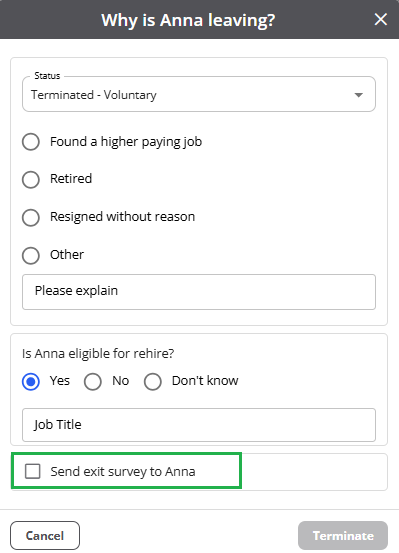
To send an exit survey, select the employee in the Exit Survey section of the Surveys Module or select the survey option when updating the employee's status, if available.
Schedule Surveys for Employee Milestones
You can use Automations to schedule surveys around employee milestones and employee check-ins.
Examples include:
- New-hire onboarding feedback
- Employee anniversary check-ins
- Regular engagement or pulse surveys
- Feedback at other important points in the employee lifecycle
Review your automation settings to ensure surveys are sent at the intended time and to the correct employees.